简单实用的网页表单设计:设计用户喜欢的网页表单(4)
3. Actions
3.操作
* Primary vs. secondary actions Primary actions are links and buttons in a form that perform essential “final” functionality, such as “Save” and “Submit.” Secondary actions, such as “Back” and “Cancel,” enable users to retract data that they have entered. If clicked by mistake, secondary actions typically have undesired consequences, so use only primary actions where possible. If you must include secondary actions, give them less visual weight than primary actions.
● 主要操作和次要操作。主要操作就是执行最后功能的链接和按钮,例如“保存”和“提交”。次要操作,诸如“后退”和“取消”,可以让用户撤消已经输入的数据。如果被误点了,次要操作一般会产生不愉快的结果,所以尽量只用主要操作。如果必须要有次要操作,那么也要让它们看起来没主要操作那么显眼。
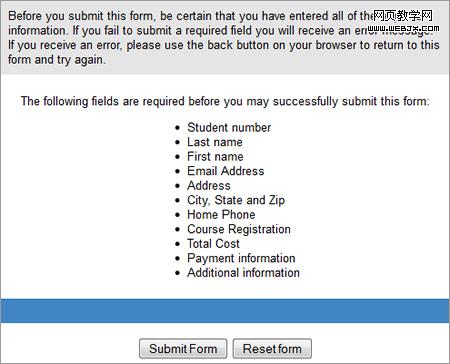
Not clearly distinguishing between primary and secondary actions can easily lead to failure. The above action buttons are found at the end of a lengthy form for enrolling in St. Louis Community College. Just imagine pressing the “Reset Form” button by accident.
不明确区分主次操作会很容易出事。上面的操作按钮,是在圣路易斯社区大学长长的报名单的最后面,想想看误按了“重设表单(reset form)”的后果吧。
* Naming conventions Avoid generic words such as “Submit” for actions, because they give the impression that the form itself is generic. Descriptive words and phrases, such as “Join LinkedIn,” are preferred.
● 命名规则。避免使用“注册”之类的常规词语,这样会让用户觉得整个表单都没意思。用“加入LinkedIn”之类的描述性单词或短语会更好一些。
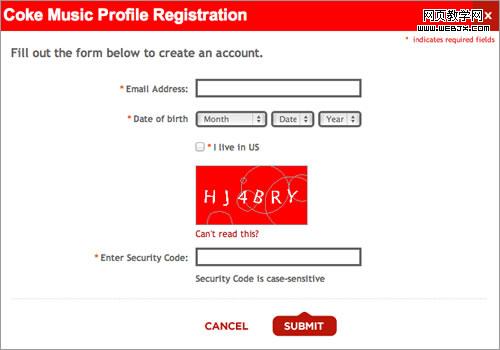
Although Coca-Cola correctly gives more importance to the primary action button, it settles for the generic word “Submit.” “Register with us” would have been more helpful.
尽管可口可乐在主次操作的处理上做得很好,但是却用了一个很平常的“注册(submit)”,换成“加入我们(register with us)”或许会更有效。
4. Help
4.帮助
* Text to accompany forms Your should never have to explain to users how to fill out a form. If it does not look like a form or it’s too complicated to fill out, then redesigning it is your only option. Accompanying text should be used only where needed, such as to explain why credit card data is being requested or how a birth date will be used or to link to the “Terms and conditions.” Such text tends to be ignored, so make it succinct and easy to read. As a rule of thumb, do not exceed 100 words of explanation (combined).
● 表单说明文字。好的表单不需要解释。如果那看起来不像表单或者很难填写,那么只有重新设计了。帮助文字只应出现在需要的地方,比如解释为什么需要信用卡信息,或者解释出生日期的用途,或者链接到“条款和条件”。这些文字很容易被忽视,所以要做得简洁易读。第一准则就是,解释文字(总共)不要超过100字。
* User-triggered and dynamic help Rather than include help text next to each input field, show it only where required. You could show an icon next to an input field that the user can click on when they need help for that field. Even better, show help dynamically when the user clicks into an input field to enter data. Such implementation is becoming more common and is relatively easy to implement with JavaScript libraries such as jQuery.
● 用户触发和动态帮助。与其在每个输入域后都加上帮助文字,不如让其只在需要时才出现。可以在输入域旁边放个小图标,让用户在需要时自行点击。或者用这个更好的,当用户在输入域里输入数据时,动态显示帮助信息。这种应用越来越普遍,使用JavaScript的库,诸如jQuery之类的,很容易实现这种效果。
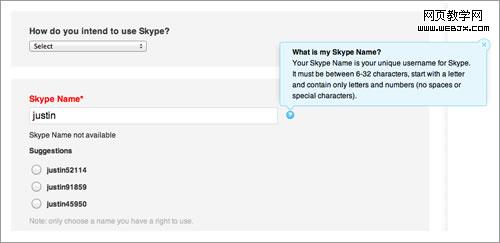
Skype’s registration form contains both user-triggered help (the blue box that is triggered by clicking the question mark) and dynamic help (the suggested user names).
Skype的注册表单既包含了用户触发帮助(蓝色的文本框是通过点击问号图标触发的),也包含了动态帮助(建议用户名)。
5. Messages
5.信息
* Error message This notifies the user that an error has occurred, and it usually prevents them from proceeding further in the form. Emphasize error messages through color (typically red), familiar iconography (such as a warning sign), prominence (typically at the top of the form or beside where the error occurred), large font, or a combination of these.
● 错误信息。告知用户有错误,通常会阻止用户继续填写表单。可以通过如下方法来强调错误信息:颜色(一般是红色),熟知图形(如警告标志),突出显示(通常在表单上方或是发生错误的侧边),大字体,或者以上综合。
* Success message Use this to notify users that they have reached a meaningful milestone in the form. If the form is lengthy, a success message encourages the user to continue filling it out. Like error messages, success messages should be prominent. But they should not hinder the user from continuing.
● 成功信息。用以告知用户其已经完成了表单的一个重要部分。如果表单很长,成功信息可以鼓励用户继续填写。跟错误信息一样,成功信息也应突出显示。但是不能阻止用户继续填写表单。
6. Validation
6.验证
* Only where needed Excessive validation is as bad as its complete absence, because it will frustrate users. Restrict validation to confirming key points (such as the availability of a user name), ensuring realistic answers (such as not allowing ages above 130) and suggesting responses where the range of possible data is finite but too long to include in a drop-down menu (such as a country-code prefix).
● 只在需要时验证。过多的验证跟完全没有的效果一样差,都会让用户受挫。验证仅限用于确认重点信息(比如验证一个用户名是否可用),确保答案真实(不允许填写130岁以上的年龄),当数据的范围有限但是太长,用一个下拉菜单显示不全时,给出反馈建议(例如一个国家的代码前缀)。
* Smart defaults Use smart defaults to make the user’s completion of the form faster and more accurate. For example, pre-select the user’s country based on their IP address. But use these with caution, because users tend to leave pre-selected fields as they are.
● 智能缺省。使用智能缺省是为了让用户更快更准确地完成填表。例如,根据用户的IP地址事先选定其国家。但是使用这些时要格外小心,因为用户一般不会去改这些事先选定项。
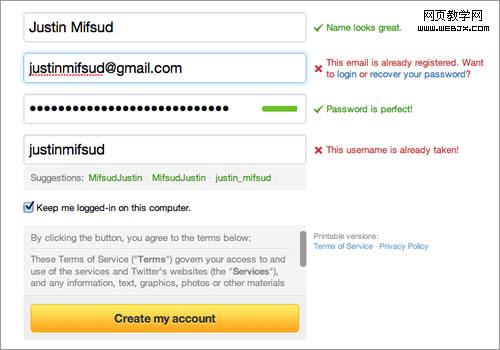
Twitter’s registration form uses both dynamic validation (for the name, email address, password and user name) and smart defaults (“Keep me logged in”).
Twitter的注册表单使用了动态验证(在姓名、邮箱、密码和用户名上)和智能缺省(“保持登录状态”)。
Conclusion The Beginning
结束语 开端
The word “conclusion” is not right here. Let this be your starting point to take what I have written about and apply it to your own forms. The good news is that there is much more to say about all this; you can find an abundance of resources on each point made here. For starters, three books are listed below that inspired me when writing this post. As I stated at the beginning, taking shortcuts by only tweaking the UI will not make your forms more usable. What more can I say? The theory is now with you. Go get your hands dirty.
结束这个词用在这里不准确。就让这里成为你学以致用的起点吧。所有这些还有很多可以研究,这里的每一点都可以找到丰富的资源。就像我在文章开始时说的,通过修改UI走捷径的方法,不会让你的表单更好用。你问我还要说点什么?现在你已经掌握这些理论了,放手干吧。