通过css和jQuery实现facebook底部的管理面板
http://www.itjxue.com 2015-08-07 21:42 来源:未知 点击次数:
近几年社交性网站变的越来越火,facebook在社交网站里面排名是靠前的。facebook里面有很多Ajax做的特效和功能给人深刻的印象。它底部的管理面板是我尤其喜欢的一个。它几乎将使用最多的功能链接都展现、组织在这里。
这周我将通过第一部分介绍如何通过css和jQuery实现facebook底部的管理面板效果。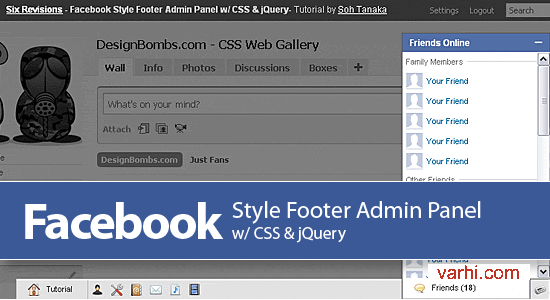
part 1 演示 | 最终演示
第一部分:结构和信息提示框——html&css
管理面板的结构使用无序列表ul创建。最后两个li列表(Alert Panel & Chat Panel)将赋予id给它们。同时将这两个结构右浮动,代码里它们的前后顺序与展现效果前后顺序是相反的。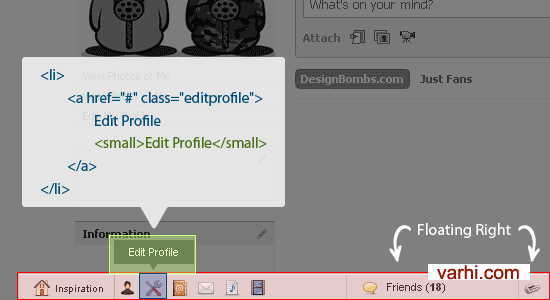
注意:a标签里面镶嵌了一个small标签,它主要是为了实现导航里面的信息提示而创建的结构。
一、HTML结构代码:
<div id="footpanel">
    <ul id="mainpanel">
        <li><a href="#">Inspiration <small>Design Bombs</small></a></li>
        <li><a href="#">View Profile <small>View Profile</small></a></li>
        <li><a href="#">Edit Profile <small>Edit Profile</small></a></li>
        <li><a href="#">Contacts <small>Contacts</small></a></li>
        <li><a href="#">Messages (10) <small>Messages</small></a></li>
        <li><a href="#">Play List <small>Play List</small></a></li>
        <li><a href="#">Videos <small>Videos</small></a></li>
        <li id="alertpanel"><a href="#">Alerts</a></li>
        <li id="chatpanel"><a href="#">Friends (<strong>18</strong>)</a></li>
    </ul>
</div>
二、CSS样式:
1、首先,先将管理面板固定在浏览器可视窗口的底部
#footpanel {
	position: fixed;
	bottom: 0; left: 0;
	z-index: 9999; /*--Keeps the panel on top of all other elements--*/
	background: #e3e2e2;
	border: 1px solid #c3c3c3;
	border-bottom: none;
	width: 94%;
	margin: 0 3%;
}
你可能知道,ie6是不支持fixed的。我偶然发现了一篇文章,通过此文章可以修复ie6的这个bug问题。
*html #footpanel { /*--IE6 Hack - Fixed Positioning to the Bottom--*/
	margin-top: -1px; /*--Prevents IE6 from having an infinity scroll bar - due to 1px border on #footpanel--*/
	position: absolute;
	top:expression(eval(document.compatMode &&document.compatMode=='CSS1Compat') ?documentElement.scrollTop+(documentElement.clientHeight-this.clientHeight) : document.body.scrollTop +(document.body.clientHeight-this.clientHeight));
}
注意:如果这样的话浏览器的解析会很慢,可选择的解决方案是要么选择绝对定位position: absolute;,要么在客户或客户端允许的情况下让其在ie6下面不显示。
2、定义管理面板的无序列表结构样式
#footpanel ul {
	padding: 0; margin: 0;
	float: left;
	width: 100%;
	list-style: none;
	border-top: 1px solid #fff; /*--Gives the bevel feel on the panel--*/
	font-size: 1.1em;
}
#footpanel ul li{
	padding: 0; margin: 0;
	float: left;
	position: relative;
}
#footpanel ul li a{
	padding: 5px;
	float: left;
	text-indent: -9999px; /*--For text replacement - Shove text off of the page--*/
	height: 16px; width: 16px;
	text-decoration: none;
	color: #333;
	position: relative;
}
html #footpanel ul li a:hover{	background-color: #fff; }
html #footpanel ul li a.active { /*--Active state when sub-panel is open--*/
	background-color: #fff;
	height: 17px;
	margin-top: -2px; /*--Push it up 2px to attach the active button to sub-panel--*/
	border: 1px solid #555;
	border-top: none;
	z-index: 200; /*--Keeps the active link on top of the sub-panel--*/
	position: relative;
}

3、给li里面的每个a标签定义相应的class用以定义图片。你可以点子此处下载图标
#footpanel a.home{
	background: url(home.png) no-repeat 15px center;
	width: 50px;
	padding-left: 40px;
	border-right: 1px solid #bbb;
	text-indent: 0; /*--Reset text indent since there will be a combination of both text and image--*/
}
a.profile{ background: url(user.png) no-repeat center center;  }
a.editprofile{ background: url(wrench_screwdriver.png) no-repeat center center; }
a.contacts{ background: url(address_book.png) no-repeat center center; }
a.messages{ background: url(mail.png) no-repeat center center; }
a.playlist{ background: url(document_music_playlist.png) no-repeat center center; }
a.videos{ background: url(film.png) no-repeat center center; }
a.alerts{ background: url(newspaper.png) no-repeat center center; }
#footpanel a.chat{
	background: url(balloon.png) no-repeat 15px center;
	width: 126px;
	border-left: 1px solid #bbb;
	border-right: 1px solid #bbb;
	padding-left: 40px;
	text-indent: 0; /*--Reset text indent since there will be a combination of both text and image--*/
}
#footpanel li#chatpanel, #footpanel li#alertpanel {	float: right; }  /*--Right align the chat and alert panels--*/

4、定义信息提示框,开始small标签是隐藏的,当鼠标经过的时候信息提示框效果则显示。
#footpanel a small {
	text-align: center;
	width: 70px;
	background: url(pop_arrow.gif) no-repeat center bottom;
	padding: 5px 5px 11px;
	display: none; /*--Hide by default--*/
	color: #fff;
	font-size: 1em;
	text-indent: 0;
}
#footpanel a:hover small{
	display: block; /*--Show on hover--*/
	position: absolute;
	top: -35px; /*--Position tooltip 35px above the list item--*/
	left: 50%;
	margin-left: -40px; /*--Center the tooltip--*/
	z-index: 9999;
}
中文原文:分析facebook网站如何定义底部管理面板
英文原文:Facebook Style Footer Admin Panel Part 1